

Designing Chat Schema in Cassandra
Partition keys, clustering keys, and designing for real-world queries


In the last post, we put ourselves in the shoes of a Facebook engineer working on designing a database like Cassandra.
We looked at the design choices we made to make sure our database is write-heavy, globally distributed, horizontally scalable, fault-tolerant, and provides fast key-based searches.
We left off on the following quote —
We don’t design our queries based on our tables; we design our tables based on our queries. And that’s the whole philosophy while working with Cassandra.
In this post, we will look at how Cassandra stores data internally, what are primary and clustering keys.
Then, finally, we will look at designing a chat storage system, the thing Facebook designed Cassandra for.
Cassandra Internals
Why “Key-Based” Access Matters
We are focusing so much on “key-based” searches; let’s understand what that means.
When we say "key-based", we mean something very specific:
We aren’t doing full table scans.
We aren’t filtering across any random fields.
We aren’t doing joins across multiple tables.
Instead, we’re saying:
If you give me the right key, I’ll give you the right data, fast.
But if you don’t, I can’t help you.
This is why Cassandra makes us design our queries to know the key before designing the models.
But to do that, we need to understand how keys are used internally.
Primary and Clustering Keys
Two types of keys shape how Cassandra stores and retrieves data:
Partition Key – decides where the data lives in the cluster.
Clustering Key – decides how the data is ordered within that partition.
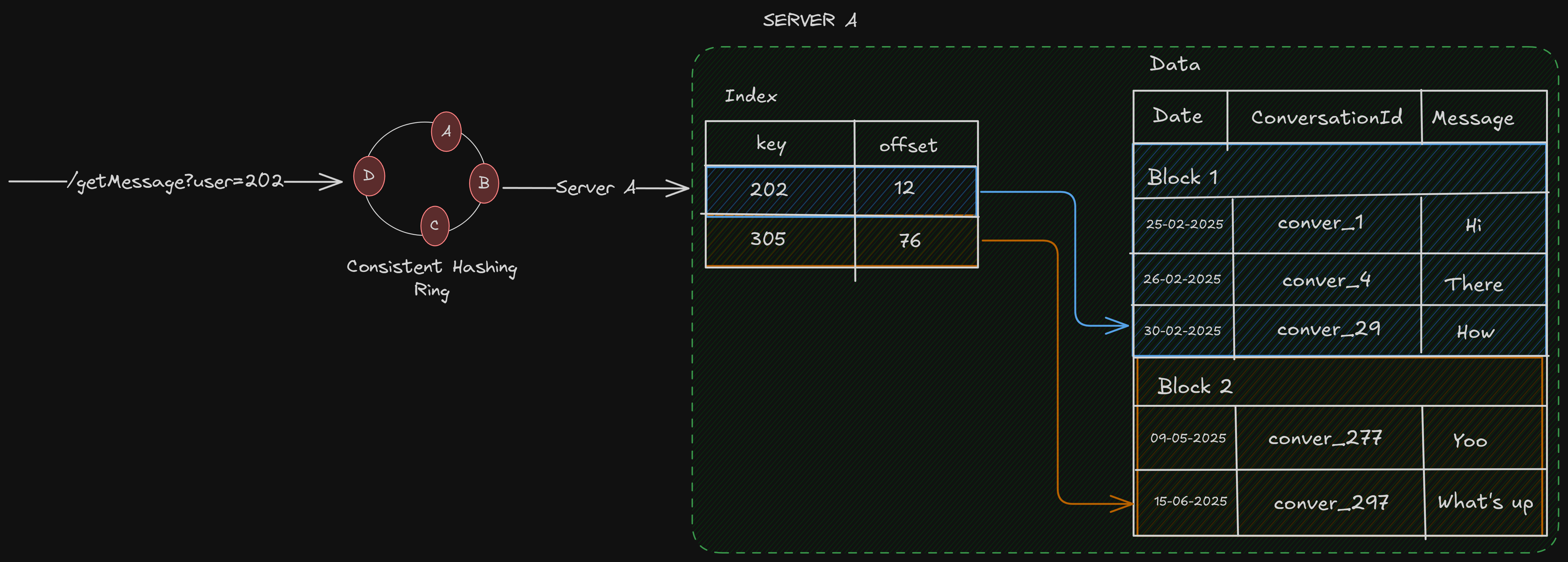
To look at it in more detail, let’s look at how data is stored in server A —
Server A (Disk)
├── Partition 1 (Partition Key: user_id = 101)
│   ├── Row 1 (Clustering Key: date = 2024-01-01)
│   ├── Row 2 (Clustering Key: date = 2024-01-02)
├── Partition 2 (Partition Key: user_id = 202)
│   ├── Row 1 (Clustering Key: date = 2024-01-03)
│   └── ...
├── Partition 3 (Partition Key: user_id = 333)
│   └── ...
Server A holds multiple small partitions, each identified by a different partition key. Within each partition, rows are sorted by clustering keys, usually for range queries.
We can think of it like this: each partition key contains a map of keys and values, sorted in our specified order.
Now, let’s say we want all to “Get all chats for user_id=202”, these are the steps that occur —
Get the server on which the
user_id=202data exists, using the consistent hashing ring.Search for the partition with
user_id=202, which searches anSSTable, and happens in logarithmic time.Since all the rows for
user_id=202reside in that partition, we can just get all the data directly.
Designing Message Storage in Cassandra
Let’s again assume we are an engineer working at Facebook in 2009, Cassandra has been created, now we need to use it to design our message store.
We can’t design our models unless we know what queries we need to support, so let’s look at the queries —
Fetch all messages in a 1:1 or group chat
Show inbox screen (recent chats + last message)
Let’s start designing our schema for each of those queries, one by one.
1. Fetch all messages in a 1:1 or group chat
We want the chat between 2 users or a group, which means we must query by the chat_id. Meaning, chat_id can be the partition key in our schema.
Also, what would be the clustering key? Well, let’s see, if I want to see the chat between 2 users, I obviously want them to be sorted by time sent.
So the timestamp can be the clustering key.
So, here is what our schema could look like —
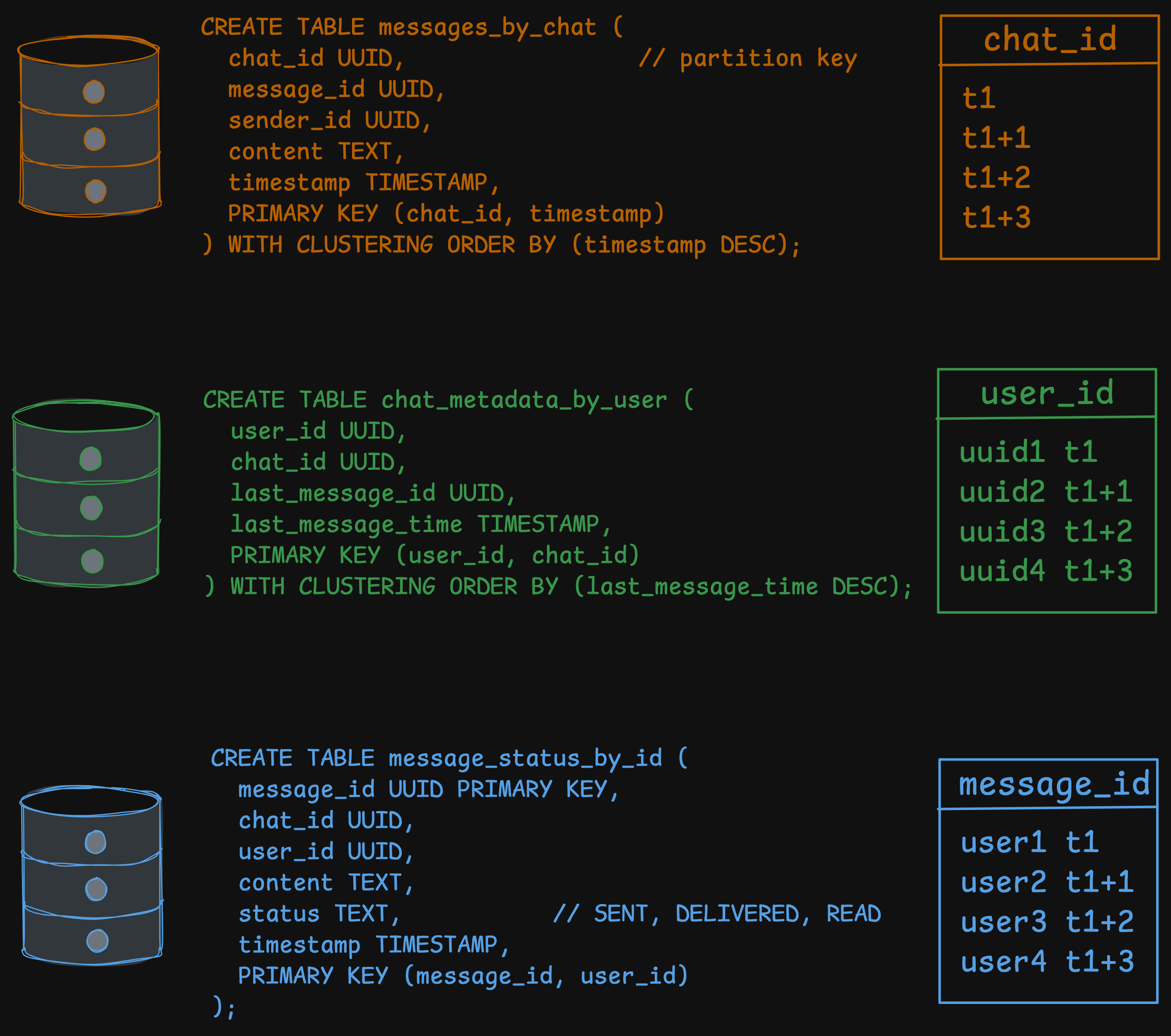
CREATE TABLE messages_by_chat (
  chat_id UUID,                 // partition key
  message_id UUID,
  sender_id UUID,
  content TEXT,
  timestamp TIMESTAMP,
  PRIMARY KEY (chat_id, timestamp)
) WITH CLUSTERING ORDER BY (timestamp DESC);
If we want to query, we can just do the following —
SELECT * FROM messages_by_chat WHERE chat_id = ? LIMIT 50;2. Show Inbox View
We show the recent chats for the user, group, and 1:1 chats included. So, we need a table where the primary key is the user_id, because we need to get the inbox for this specific user.
Since each user can be a part of different chats, with their own chat_id, we can make it a clustering key.
CREATE TABLE chat_metadata_by_user (
  user_id UUID,
  chat_id UUID,
  last_message_id UUID,
  last_message_time TIMESTAMP,
  PRIMARY KEY (user_id, chat_id)
) WITH CLUSTERING ORDER BY (last_message_time DESC);
Let’s look at how the partition and clustering keys are designed, and why.
Partition key — user_id, just search by
user_idis enoughClustering key — for each
user_id, at the same time, there can be multiple messages, belonging to differentchat_id
So this way, it ensures —
user_idis the partition key → all data for a user resides in itWithin that user’s partition:
There can be multiple
chat_idfor eachuser_idRows are sorted by
last_message_time
In the above table, we are not storing the actual message, just a UUID to the last_message_id, which means we need to search by message_id.
In the tables we have currently — messages_by_chat and chat_metadata_by_user.
We don’t have message_id as a partition key, so we can’t search by it. That means we need another table.
CREATE TABLE message_status_by_id (
  message_id UUID PRIMARY KEY,
  chat_id UUID,
  user_id UUID,
  content TEXT,
  status TEXT,           // SENT, DELIVERED, READ
  timestamp TIMESTAMP,
  PRIMARY KEY (message_id, user_id)
);
Every time a message is written to messages_by_chat:
Update
chat_metadata_by_userfor every participantUpdate their
last_message_id,last_message_time
Now, to show the inbox view, we just need to do the following queries —
Show the recent 20 inbox views for the user
SELECT * FROM chat_metadata_by_user WHERE user_id = ? LIMIT 20;Show message preview for each of the chats
SELECT content FROM message_status_by_id WHERE message_id = ?;Improvements
But this poses a problem, for every user, we need to query the database 21 times (1 for chat_metadata_by_user, and 1 for each of the 20 chats).
Can we do something better? Let’s see.
We are querying each of the 20 recent chats because we don’t know the message content such as who sent it, and what was the content of the message.
What if we put these values in our
chat_metadata_by_usertable?
Something like this —
CREATE TABLE chat_metadata_by_user (
  user_id UUID,
  chat_id UUID,
  last_message_id UUID,
  last_message_time TIMESTAMP,
  last_message_content TEXT,  // New column!
  last_message_sender_id UUID, // New column!
  PRIMARY KEY (user_id, chat_id)
) WITH CLUSTERING ORDER BY (last_message_time DESC);
This way, we can get the last_message_sender_id, last_message_content by just 1 query —
SELECT * FROM chat_metadata_by_user WHERE user_id = ? LIMIT 20;But this has some tradeoffs.
Tradeoffs
Increased write amplifications
Every time a new message is sent, we have to
write not only to
messages_by_chatandmessage_status_by_idalso update
last_message_contentandlast_message_sender_id(along withlast_message_idandlast_message_time) in thechat_metadata_by_usertable for every participant in the chat.
This means more data is being written on each message sent. However, in Cassandra, writes are generally much cheaper than reads, so this is often an acceptable trade-off for critical read paths.
Data Duplication
We are explicitly duplicating the message content.
The content for the last message will exist in messages_by_chat (the full history), message_status_by_id (for detailed status tracking), and now chat_metadata_by_user (for the inbox preview).
Final User Flows
So we have designed the schema based on the features/queries we provide. Now, let’s look at the different user flows and what kind of queries are needed.
Write Path
When Sahil sends a message to a group chat_id = x with users A, B, C:
Write to
messages_by_chatfor the chat threadFor each participant:
Update
chat_metadata_by_userInsert into
messages_status_by_idasSTATUS = SENT
Read Path (Inbox)
When user B opens the app:
Query
chat_metadata_by_user WHERE user_id = B LIMIT 20For each chat_id:
Fetch the last message from
messages_by_chat
Questions worth asking
Let’s look at some questions I had while working on this problem.
Can we search by clustering keys?
Yes, but only if —
Specify the full partition key (
chat_id)filter the clustering key(s) in order defined in the schema
Don't skip clustering key levels (previous clustering keys in order)
So, if we had a schema like PRIMARY KEY ((chat_id), sender_id, message_id)
We must filter them like:
sender_id = ?or
sender_id >= ? AND message_id >= ?
But not:
message_id = ?(without filteringsender_id)message_id > ?(alone) ← Invalid
What if the data in a partition becomes too huge?
We saw that all the data for a partition key lies in it, notice that “all the data”. Since Cassandra doesn’t store in chunks, the amount of data being stored may become too huge.
Let’s say in our message chat, there is a celebrity chat, where millions of people send messages every single second, something like a Discord channel.
For the table messages_by_chat, keys are like this —
Partition key —
chat_idClustering key —
timestamp
This schema completely fails under chat with millions of users, messaging at the same time.
chat_idis the partition key.All messages for that chat go into one partition, which maps to a specific set of replicas.
Reads become expensive (because rows are sorted by timestamp → we scan large data chunks).
This causes a write hotspot (too much write on a single partition, server), compaction stress for that partition (the LSM compaction).
Even if we read only the last 50 messages, Cassandra may need to touch 50MB, 100MB, or even 1GB of partition data, depending on how it's laid out in SSTables.
So, how do we modify our schema?
We need a better partition key, something that won’t be bloated easily, and the data is distributed evenly.
Something like —
PRIMARY KEY ((chat_id, bucket_day), timestamp)Bucket day can be like — 2025-02-23
Pros:
Limits each partition to only 1 day.
Allows us to query: “latest messages from today.”
Cons:
Needs to query multiple buckets if we want history across multiple days.
It may still be hot if millions of messages come in per day.
But this is one of the ways to tackle the issue.
Too much duplicated data
Yeah, I feel like we are duplicating a lot of data. For almost every type of query, we need a different table, and we duplicate the data in multiple tables.
Also, the updates are not cascaded to different tables automatically, since Cassandra doesn’t follow joins/foreign keys. This means the application is responsible for all the updates explicitly to the corresponding tables.
Atomicity
Cassandra is distributed, but it’s not a distributed SQL-like database. It doesn’t support transactions in a traditional sense.
For a distributed database designed for write-heavy systems —
Locking is an anti-pattern: Locking data across multiple nodes in a distributed system would be incredibly slow and fragile. If a node holding a lock goes down, the entire system could stop.
Rollback is impossible: If a transaction involves multiple nodes, and a failure occurs after some writes have succeeded but others have not, how do we "roll back" the changes on the nodes that are still up? We can't.
So, Cassandra provides some other ways.
Atomic Writes at the Row/Partition Level
Cassandra guarantees that a single write to a single row (or partition, which is a collection of rows) is atomic. This means that when we write a single statement either all the changes succeed or none do.
Example: We can update multiple columns in a single row at once, and it's guaranteed to be an all-or-nothing operation. This is good for things like updating the last_message_time and last_message_id in our chat_metadata_by_user table in one go.
Batches - The Illusion of Transactions
We can use BATCH statements to group multiple writes together. Cassandra guarantees that all writes in a BATCH will eventually succeed or fail as a group.
But this is an eventual guarantee. Cassandra writes the batch to a batchlog and then processes the individual writes. If the coordinator node fails, another node can read the batchlog and retry the writes.
This is not atomic in the ACID sense, as other clients might see a partial state of the batch while it's in progress. It's best used for convenience and performance, grouping writes to the same partition, not for maintaining cross-partition consistency.
Wrapping Up
In this post, we went deep into Cassandra’s internals, explored how partition and clustering keys shape data storage, and built a concrete chat system schema from scratch. Along the way, we saw why designing tables around queries, not the other way around, is the key to working effectively with Cassandra.
We also confronted the trade-offs that come with distributed, write-heavy databases:
Duplication is inevitable: Each query might need its own table, and updates must be handled at the application level.
Writes are cheap, reads are precious: Optimizing for fast key-based access often means writing more, but reading less.
Hot partitions are real: Careful partitioning strategies, like bucketing by date, are essential to avoid hotspots and performance degradation.
Atomicity has limits: Cassandra offers atomicity at the row/partition level, but distributed transactions across partitions are a different challenge.
Ultimately, this exercise isn’t just about Cassandra—it’s about thinking like a distributed systems engineer. Understanding the underlying storage, the cost of operations, and the user query patterns allows you to make design decisions that are fast, scalable, and resilient.
Since this is the first time for me tackling Cassandra, I would love to get more thoughts on this design. Let me know in comments.
That’s all for today.
Was good read. Thank you